Image to Image AI – AI Image Generation Tool for Photo Variations

Image to Image AI turns any photo into fresh, high-quality variations in seconds, offering multi-style editing with zero design skills required.

Quick Facts - About Image to Image AI

Category AI Image Generation
Pricing Freemium
Platform Web
Main Features Multi-style variations, fast transforms, high-res outputs
Best For Photographers, designers, social media managers
Language Support English
Integrations Web-based, no install required
Deployment Cloud

What is Image to Image AI ?

Image to Image AI is an AI-powered image transformation tool that converts any photo into multiple stylistic variations in seconds. Using advanced diffusion technology, it preserves key subject details while applying diverse styles. It serves creatives, marketers, and hobbyists who want quick concept visuals without hiring designers, with presets and manual controls to tailor results.

Description

1. Multi-Style Variations

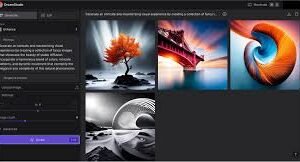
  • Generate dozens of distinct styles from a single photo with a single click.
  • Preserve core subjects while transforming mood, color, and texture.

2. Quick Transformations

  • Process results in seconds to accelerate workflows.
  • Iterate concepts rapidly for faster decisions and approvals.

3. Intuitive Editing Playground

  • User-friendly interface with drag-and-drop and visual sliders.
  • Fine-tune style strength, texture, contrast, and color balance easily.

4. High-Resolution Outputs

  • Export crisp images suitable for social, web, and print.
  • Supports upsampling with minimal quality loss for large formats.

5. Creative Controls & Presets

  • Prebuilt aesthetics for portraits, landscapes, and product shots.
  • Adjust style weights for precise, repeatable outputs.

6. Privacy & Ownership

  • In-browser processing with encrypted data handling.
  • Clear licensing terms for commercial use and redistribution.
Reviews

There are no reviews yet.

Be the first to review “Image to Image AI – AI Image Generation Tool for Photo Variations”

Pricing & Plans Of Image to Image AI

Image to Image AI offers a generous free tier to explore core features, with scalable paid plans for higher usage and team needs. Plans are designed to fit individuals, small teams, and enterprises.

Pro's

  • No design skills required for stunning variations.
  • Fast processing with high-quality outputs.
  • Flexible presets and precise controls for customization.

Con's

  • Free tier has limited daily renders and watermarks on some outputs.
  • Advanced users may want deeper API access for automation.

Popular Use Cases of Image to Image AI

  • Personal use
  • Marketing visuals and social content
  • Product photography variations
  • Educational projects and demonstrations

Alternatives of Image to Image AI

Tool Best For How It Compares
Stable Diffusion Image-to-Image Artistic transformations Open model with broad style control; requires setup
Midjourney Creative concept art Strong aesthetic output; interface is prompt-driven rather than image-edit focused
Runway Gen-1 Integrated media workflows Excellent for video and image pipelines; more complex to learn
DALL·E 3 Prompt-based generation Great for prompts and text-driven creativity; less direct image editing

Feedback

From G2: Very intuitive interface that consistently delivers fast, high-quality image variations.

From Trustpilot: Excellent tool for quick image transformations with rich creative options and speed.

FAQs related to Image to Image AI

  1. What formats are supported?
    Outputs are provided in common image formats suitable for web and print.
  2. Can I use outputs commercially?
    Yes, the licensing terms cover commercial use for most plans.
  3. Is there a watermark on outputs?
    Watermarks may appear on outputs from the free tier; paid plans offer watermark-free results.

Transform Your Photos into Stunning Variations Today

Ready to unlock endless creative possibilities? Start with Image to Image AI for fast, beautiful visuals that fit your brand and message—no design skills required. Try it now and see the difference in seconds.

Related Tools