Amp – Model-agnostic coding assistant inside your IDE

model-agnostic coding assistant Amp helps developers code faster inside their IDEs with context-aware suggestions. It supports multiple languages and aims to reduce context switching by keeping guidance in place.

Category
For Model-agnostic coding agent

Quick Facts - About Amp

Category IDE Extension
Pricing Freemium
Platform Windows, macOS, Linux IDEs
Main Features Model-agnostic coding agent, in-editor suggestions, explanations
Best For Developers who want AI help inside their IDEs without vendor lock-in
Language Support Multiple languages
Integrations Popular IDEs and editors
Deployment Local and cloud options

What is Amp ?

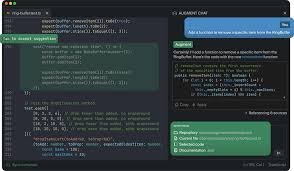
Amp is an AI-powered coding assistant that sits inside your IDE, offering model-agnostic guidance, code completions, and explanations in real time.
Amp helps reduce context switching by keeping AI assistance within the editor, benefiting both individual developers and teams who value flexibility and vendor neutrality.

Description

1. Model-agnostic coding agent

  • Recognizes and assists with code in multiple languages and frameworks.
  • Keeps context within the current file and project to provide relevant suggestions.

2. Real-time in-editor code suggestions

  • Delivers autocomplete and proactive improvements as you type.
  • Works across popular IDEs and editors.

3. Explain code and reasoning

  • AI explains why it suggests changes and how they fit your project.
  • Helps teammates understand recommendations quickly.

4. Free ad-supported tier

  • No upfront cost to start; ads help sustain access.
  • Ad experience is non-intrusive in the editor.

5. No vendor lock-in

  • Prompts and data stay portable across tools.
  • Export and import settings without migration pain.

6. Pro plans enhance your workflow

  • Priority support and advanced templates.
  • Team features for collaboration and governance.
Reviews

There are no reviews yet.

Be the first to review “Amp – Model-agnostic coding assistant inside your IDE”

Pricing & Plans Of Amp

Pricing is freemium with a free tier and a Pro plan.

  • Free: Free – Access core Amp features with ads and no vendor lock-in.
  • Pro: $15/mo – Unlock advanced features and priority support.

Pro's

  • Ad-supported free tier lowers the entry barrier.
  • No vendor lock-in keeps your options open across IDEs.
  • Model-agnostic support spans multiple languages and frameworks.
  • In-IDE guidance reduces context switching and keeps you in flow.
  • Pro plan adds priority support and templates to boost productivity.

Con's

  • Ads may distract some users in the free tier.
  • Pricing for Pro might be a consideration for small teams.

Popular Use Cases of Amp

  • In a React project, Amp suggests component implementations and fixes in real time.
  • In a Python data analysis notebook, Amp offers code completions and explanations for pandas operations.
  • During a code review, Amp explains suggested refactors to teammates.
  • While learning a new language, Amp provides quick examples and syntax help within the editor.

Alternatives of Amp

Tool Best For How It Compares
GitHub Copilot General coding assistance inside IDEs Deep IDE integration with GitHub ecosystem; may rely on subscription.
Tabnine AI autocomplete with model choices Offers local models and privacy controls; setup varies by IDE.
Kite Python focused code completions Strong Python support; language coverage may be uneven elsewhere.

Feedback

Representative user feedback:
“Saves time coding, but ads in the free tier can be distracting.”

Representative user feedback:
“Great for quick prototyping, but some features require a paid plan.”

FAQs related to Amp

  1. What is Amp used for?
    Amp is an AI-powered coding assistant that runs inside your IDE to help with code completion, explanations, and guidance across languages.
  2. Does Amp support my language?
    Amp supports multiple languages and can adapt to different frameworks within the IDE.
  3. Is there a free plan?
    Yes, Amp offers a free, ad-supported tier and a Pro plan for advanced features.
  4. Can I export my settings or data?
    Yes, Amp provides options to export prompts and settings for portability.

Start Capturing Code Insights Today

Install Amp in your IDE and start receiving in-context coding guidance. See faster iteration, fewer syntax errors, and smoother collaboration while staying in your editor.

Related Tools