Classpoint AI – AI Quiz Generation in PowerPoint

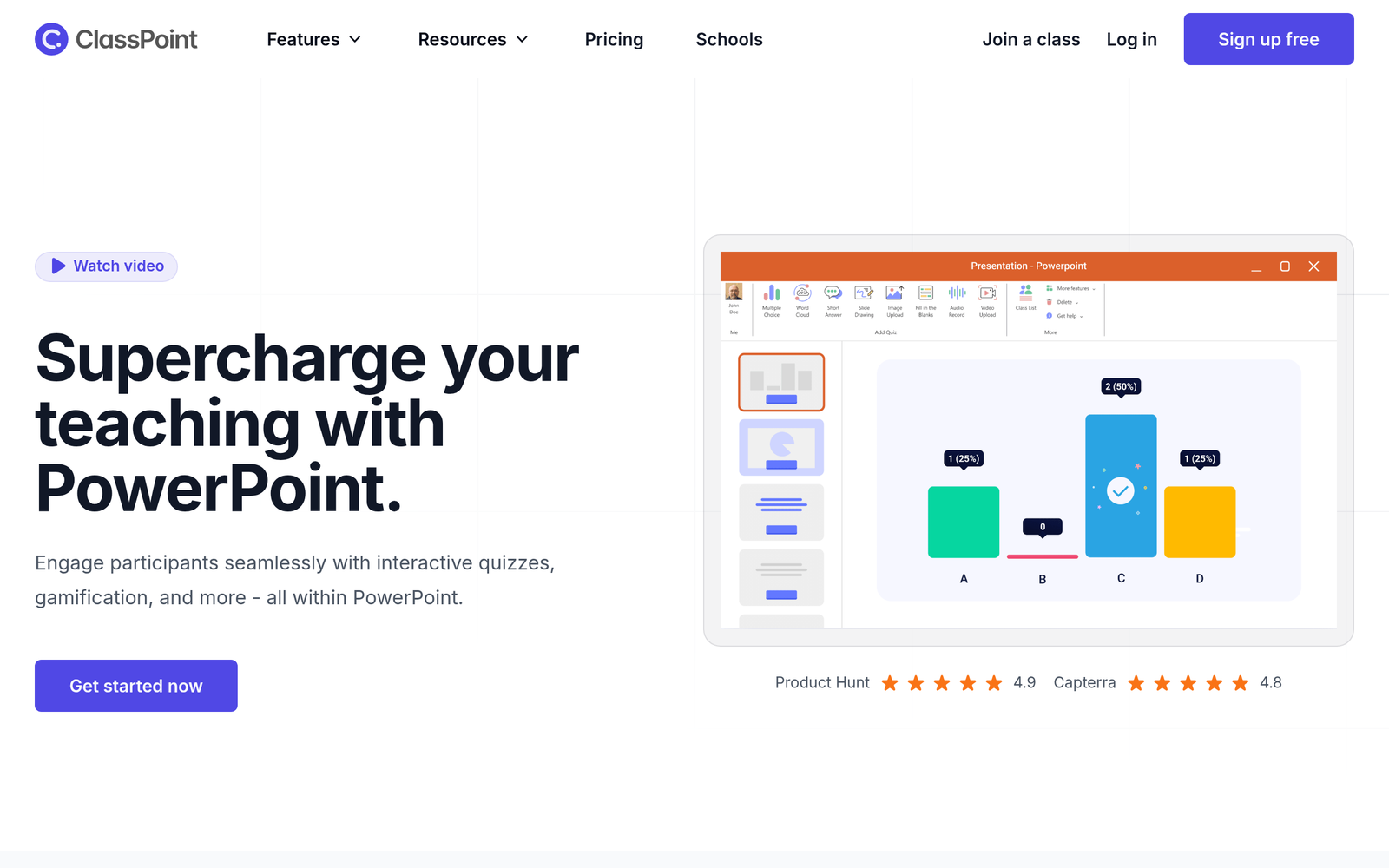
ai quiz generation in PowerPoint helps teachers quickly turn slides into ready-to-use assessments. It saves prep time and boosts classroom engagement.

For AI quiz generation inside PowerPoint

Quick Facts - About Classpoint AI

Category Lesson Planning & Teacher Tools
Pricing Freemium
Platform PowerPoint
Main Features AI quiz generation, slide-to-quiz conversion, auto-grading
Best For Teachers and classrooms
Language Support English
Integrations PowerPoint, Classpoint ecosystem
Deployment Desktop/Office 365

What is Classpoint AI ?

Classpoint AI is an AI-powered tool that lives inside PowerPoint to generate quizzes from your slides and instantly turn any slide into an interactive activity. It solves the time drain teachers face when creating quizzes and helps both teachers and students in blended or remote classrooms.

Description

1. Smart Quiz Generator

  • Generates questions from slide content to save time.
  • Supports multiple choice, true/false, and short answer formats.

2. Slide-to-Quiz Conversion

  • Instantly converts any slide into a quiz.
  • Preserves layout and visuals for seamless testing.

3. Real-time Student Feedback

  • Captures live responses from students during class.
  • Displays analytics to guide quick checks for understanding.

4. Customizable Question Types

  • Includes MCQ, true/false, short answer, and matching.
  • Allows teachers to tailor quizzes to lesson goals.

5. Auto-Scoring & Reports

  • Auto-grades submissions for fast feedback.
  • Generates class-wide reports and trends over time.

6. Seamless PowerPoint Integration

  • Works within PowerPoint without leaving the app.
  • Preserves slide design and media while quizzing.

7. Offline/Online Accessibility

  • Quizzes work with or without an internet connection.
  • Syncs results when reconnected to the internet.
Reviews

There are no reviews yet.

Be the first to review “Classpoint AI – AI Quiz Generation in PowerPoint”

Pricing & Plans Of Classpoint AI

Pricing starts with a Free tier, then paid plans.

  • Free: Free – Basic quiz generation inside PowerPoint with limited features.
  • Pro: $8.33/mo – Individual teacher access with full quiz gen and standard features.
  • Team: $16.67/mo – Collaborative features for multiple teachers and classrooms with admin controls.
  • Starter: Contact for pricing – Scaled features for small schools.
  • Business: Contact for pricing – Expanded admin and reporting capabilities for districts.
  • Enterprise: Contact for pricing – Custom deployment and SLA for large districts.

Pro's

  • Quizzes generated directly from slide content save prep time.
  • Real-time feedback helps adjust teaching on the fly.
  • Auto-grading provides immediate results and analytics.
  • Works with existing PowerPoint decks, no new tool to learn.
  • Clear reporting makes it easy to track class progress.

Con's

  • Free tier may have feature limits, requiring paid plans for full use.
  • AI interpretation may misread complex slide content.
  • Requires internet for AI features (some offline functionality is limited).

Popular Use Cases of Classpoint AI

  • A high school history teacher converts a week’s slides into a quick review quiz before exams.
  • A college lecture uses slide-based quizzes as in-class checks for understanding.
  • An online course creator turns lecture slides into weekly quizzes for self-paced learners.
  • A professional development trainer adds quick assessments into slide decks for workshops.

Alternatives of Classpoint AI

Tool Best For How It Compares
Kahoot! Live game-style quizzes in class Standalone platform; not embedded inside PowerPoint slides as directly as Classpoint AI.
Quizizz Self-paced quizzes with extensive library Large content library; integration not tied to PowerPoint slides
Nearpod End-to-end interactive lessons Lesson-wide experience; Classpoint AI adds AI-powered quiz gen inside PowerPoint

Feedback

Representative user feedback:
“Teachers appreciate faster quiz creation and clearer student engagement during lessons.”

Representative user feedback:
“Admins value easier progress tracking and classroom analytics from built-in reports.”

FAQs related to Classpoint AI

  1. Is Classpoint AI compatible with PowerPoint on Windows and Mac?
    Yes, it runs inside PowerPoint on supported platforms; AI features require internet access.
  2. Can I generate quizzes from existing slide decks?
    Yes, it can turn content on slides into quiz questions automatically.
  3. Does it auto-grade quizzes?
    Yes, auto-grading is available with basic reporting.
  4. How do pricing tiers affect features?
    Free plan covers essential quiz generation; Pro and higher plans add advanced features and team options.

Start turning slides into quizzes now

Open PowerPoint, enable Classpoint AI, and watch a slide deck become a quiz in minutes. You\'ll save prep time, boost student engagement, and get clear results fast.

Related Tools