Canva AI Photo – AI Image Generation for Creative Design

Canva AI Photo empowers users to create unique images and designs using artificial intelligence. It helps designers, marketers, and creators quickly visualize ideas, customize visuals, and overcome creative blocks directly within the familiar Canva environment, making design accessible and efficient.

Quick Facts - About Canva AI Photo

Category Design assistant
Pricing Freemium
Platform Web, iOS, Android, Desktop App
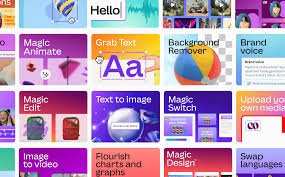
Main Features Text-to-Image, Magic Edit, Style Transfer, Background Tools, Image Expansion
Best For Designers, Marketers, Content Creators, Small Businesses, Educators
Language Support Multiple languages
Integrations Canva ecosystem (Google Drive, Dropbox, social media platforms)
Deployment Cloud-based

What is Canva AI Photo ?

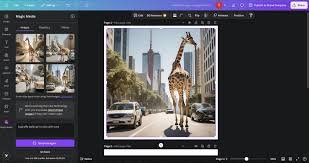
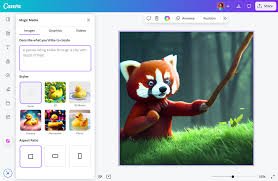
Canva AI Photo is an AI-powered feature integrated within the popular design platform Canva, allowing users to generate custom images from text descriptions or modify existing visuals with AI. It leverages advanced algorithms to transform textual prompts into unique graphic elements, photos, or artistic styles.

This intelligent tool simplifies the visual creation process, enabling anyone from seasoned designers to marketing professionals and hobbyists to bring their creative visions to life without needing external photo libraries or complex image editing software.

Description

1. Text-to-Image Generation

  • Instantly create unique images by simply describing what you envision.
  • Eliminate the need for stock photos and achieve perfectly customized visuals.

2. AI Magic Edit

  • Modify specific areas of your images with AI, adding or removing elements seamlessly.
  • Transform parts of your design to match new creative directions without starting over.

3. Style Transformations

  • Apply various artistic styles to your generated or existing photos, from watercolor to 3D rendering.
  • Experiment with different aesthetics to find the perfect visual tone for your projects.

4. Background Removal and Generation

  • Effortlessly remove complex backgrounds or generate entirely new ones with intelligent AI assistance.
  • Place subjects into diverse environments, expanding creative possibilities for product mockups or scene creation.

5. Image Expansion and Inpainting

  • Expand the borders of an image or fill in missing sections with contextually relevant AI-generated content.
  • Resize and adapt visuals for different aspect ratios while maintaining coherence and quality.

6. Brand Kit Integration

  • Ensure AI-generated visuals align with your brand’s aesthetic and color palette.
  • Maintain consistency across all your designs, whether human-made or AI-generated.
Reviews

There are no reviews yet.

Be the first to review “Canva AI Photo – AI Image Generation for Creative Design”

Pricing & Plans Of Canva AI Photo

Canva AI Photo features are integrated into the Canva platform, offering a range of capabilities from free to premium tiers depending on the complexity and volume of AI usage.

  • Free plan: Access to basic AI photo generation and editing tools with credit limits.
  • Paid plan (Canva Pro): Unlimited access to AI features, advanced tools, premium templates, and more credits.
  • Enterprise plan: Custom solutions with extensive AI capabilities, brand controls, and team management for large organizations.

Pro's

  • Seamless integration within the familiar Canva design environment.
  • Accessible for users of all skill levels, from beginners to professionals.
  • Wide range of AI tools for generating, editing, and enhancing images.
  • Significantly speeds up the design process and visual content creation.
  • Reduces reliance on external stock photo libraries.

Con's

  • AI-generated results may sometimes require further refinement or multiple attempts.
  • Credit limits can apply to extensive AI usage on free or lower-tier plans.
  • Specific creative control might still be limited compared to specialized AI art tools.

Popular Use Cases of Canva AI Photo

  • Creating unique social media graphics and ads.
  • Designing marketing materials and website visuals.
  • Generating personalized illustrations for presentations and reports.
  • Visualizing concepts for product mockups or scene designs.
  • Enhancing existing photos for blogs or personal projects.

Alternatives of Canva AI Photo

Tool Best For How It Compares
Midjourney Artistic and highly stylized image generation Offers more advanced artistic control and distinct styles, but requires more technical prompting.
DALL-E 3 (via ChatGPT Plus) Versatile image generation with strong textual understanding Integrated into a conversational AI, excellent for complex prompts, but not a full design suite.
Adobe Firefly Generative AI integrated into professional design workflows Focuses on ethical AI and integration with Adobe Creative Cloud, strong for commercial use.

Feedback

From G2:

“Canva’s AI photo tools have genuinely sped up my social media content creation. I can get unique visuals in minutes without leaving the platform.”

From Capterra:

“The Magic Edit feature is a game-changer for quick design tweaks. I can adapt images on the fly, which saves so much time.”

FAQs related to Canva AI Photo

  1. What is Canva AI Photo?
    Canva AI Photo refers to the suite of AI-powered image generation and editing tools available within the Canva design platform.
  2. Is Canva AI Photo free to use?
    Basic AI photo features are available on Canva’s free plan with certain credit limits, while advanced tools and higher usage require a Canva Pro subscription.
  3. What types of images can I create with Canva AI Photo?
    You can generate a wide variety of images, from realistic photos to illustrations, abstract art, and icons, based on your text prompts.
  4. Can I use AI-generated images for commercial purposes?
    Yes, images created with Canva AI Photo can generally be used for commercial purposes, subject to Canva’s terms of service regarding AI content.

Start Designing Smarter with AI Today

Ready to revolutionize your creative workflow? Dive into the world of AI-powered design with Canva AI Photo. Generate unique visuals, effortlessly edit existing images, and bring your most ambitious ideas to life faster and more intuitively than ever before. Join millions of creators who are already transforming their designs with the power of artificial intelligence.

Related Tools