ComfyUI – Node-based GUI for Advanced AI Image Workflow Creation

ComfyUI is a powerful open-source node-based graphical user interface designed for advanced users, developers, and designers to create complex AI image generation and processing workflows. It offers unparalleled flexibility and control over AI models like Stable Diffusion, allowing for precise experimentation and customized results.

Quick Facts - About ComfyUI

Category Node-based GUI, AI Image Generation
Pricing Free, Open-Source
Platform Desktop (Windows, Linux, macOS), Cloud (via services)
Main Features Node-based workflows, Model flexibility, Real-time visualization, Customization
Best For Developers, Designers, Advanced users, AI researchers
Language Support English
Integrations Stable Diffusion models, various AI tools (via custom nodes)
Deployment Self-hosted, local installation, cloud services

What is ComfyUI ?

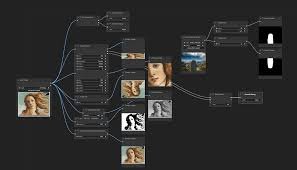
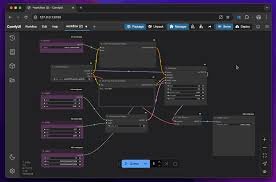
ComfyUI is an AI-powered node-based GUI that empowers users to build intricate and highly customizable workflows for AI image generation. Unlike simpler interfaces, ComfyUI provides a visual programming environment where each step of the AI process, from loading models to sampling and post-processing, is represented by a connectable node.

This open-source platform is ideal for those who require deep control over their AI art generation, enabling them to experiment with various parameters, combine different models, and achieve highly specific creative outcomes without needing to write code directly.

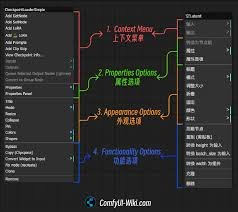
Description

  1. Node-Based Workflow Editor
    • Visually construct complex AI pipelines by connecting different operational blocks.
    • Gain granular control over every step of the image generation process.
  2. Extensive Model Compatibility
    • Supports a wide range of AI models, including Stable Diffusion, LoRAs, and checkpoints.
    • Flexibly integrate and switch between various models for diverse outputs.
  3. Real-time Workflow Visualization
    • See the data flow and processing steps in real-time as you build your graph.
    • Easily debug and optimize your workflows for efficiency and desired results.
  4. Custom Scripting and Extensions
    • Extend functionality with custom nodes and Python scripts for unique operations.
    • Tap into a vibrant community for a vast library of user-contributed tools.
  5. Parameter Fine-Tuning
    • Adjust every possible parameter for models, samplers, and other components.
    • Achieve highly specific and nuanced artistic styles and compositions.
  6. Batch Processing Capabilities
    • Automate the generation of multiple images or variations efficiently.
    • Streamline your creative pipeline for large-scale projects and experiments.

Reviews

There are no reviews yet.

Be the first to review “ComfyUI – Node-based GUI for Advanced AI Image Workflow Creation”

Pricing & Plans Of ComfyUI

ComfyUI is completely free and open-source, allowing users to download and run it locally without any subscription fees. Costs may arise from hardware requirements or optional cloud hosting services.

  • Free plan: Full access to all features and capabilities via local installation.
  • Paid plan: Not applicable for ComfyUI itself; costs are external (e.g., cloud GPU usage).
  • Enterprise plan: No direct enterprise plan; custom solutions can be built on the open-source core.

Pro's

  • Unmatched flexibility and control over AI image generation workflows.
  • Completely free and open-source with a strong community.
  • Visually intuitive node-based interface for complex tasks.
  • Supports a wide array of AI models and customization options.
  • Ideal for detailed experimentation and research in AI art.

Con's

  • Steep learning curve for beginners due to its advanced nature.
  • Requires robust hardware (GPU) for efficient local operation.
  • Initial setup can be more involved than plug-and-play solutions.
  • Less user-friendly for quick, simple image generations compared to simpler UIs.

Popular Use Cases of ComfyUI

  • Advanced AI art generation and experimentation.
  • Developing custom AI image processing pipelines.
  • Research and development in AI model interaction.
  • Fine-tuning and combining multiple generative AI models.
  • Creating specific visual assets for games, design, or multimedia.

Alternatives of ComfyUI

Tool Best For How It Compares
Automatic1111 Stable Diffusion WebUI General users, extensive features, large community More beginner-friendly interface, but less granular control than ComfyUI’s node-based approach.
InvokeAI Artists, creative professionals, user experience Offers a blend of user-friendliness and powerful features; a good balance between ease of use and flexibility.
Fooocus Simplicity, quick high-quality results, minimal setup Extremely simplified, often considered “ComfyUI for dummies” – much less control but very easy to use.

Feedback

From GitHub Discussions:
“ComfyUI has completely changed how I approach Stable Diffusion, giving me incredible control and flexibility for my projects.”

From Reddit (r/StableDiffusion):
“The learning curve is real, but once you get it, there’s no going back. The power of custom workflows is amazing!”

FAQs related to ComfyUI

  1. What is ComfyUI used for?
    ComfyUI is primarily used for advanced, node-based workflows in AI image generation, offering deep control over models like Stable Diffusion.
  2. Is ComfyUI free to use?
    Yes, ComfyUI is completely free and open-source. You can download and install it locally without any cost.
  3. Do I need a powerful computer for ComfyUI?
    For efficient image generation, a powerful GPU (Graphics Processing Unit) is highly recommended, especially for complex workflows.

Unleash Your Creative Potential with ComfyUI

Ready to move beyond basic AI image generation? ComfyUI offers the deep control and flexibility you need to craft truly unique visuals and experiment with advanced techniques. Download ComfyUI today and start building sophisticated AI workflows that bring your most ambitious creative visions to life.

Related Tools