
HitPaw Video Enhancer – AI-Powered Video Upscaling and Quality Improvement

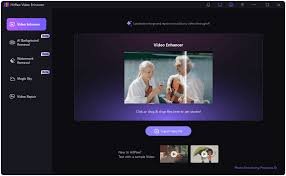
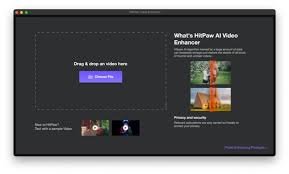
HitPaw Video Enhancer is a desktop AI tool that boosts video clarity and resolution, helping creators, editors, and marketers transform ordinary clips into sharp, cinema-grade footage.

Quick Facts - About HitPaw Video Enhancer

Category Video Enhancement
Pricing Freemium
Platform Windows, macOS
Main Features Upscaling, denoise, color correction, stabilization, batch processing
Best For Content creators, editors, marketers
Language Support English, multilingual UI
Integrations Standalone desktop app
Deployment Desktop software (offline processing)

What is HitPaw Video Enhancer ?

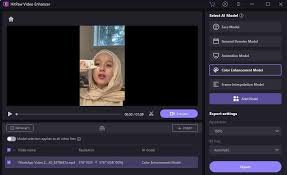
HitPaw Video Enhancer is an AI-powered video quality toolkit that elevates low-resolution footage to sharper, more detailed output. It combines powerful upscaling and restoration algorithms to improve clarity across multiple formats. It also offers precise color tuning and artifact reduction to deliver cinema-grade results.

Description

1. AI-Powered Upscaling and Detail Restoration

  • AI-driven algorithms enlarge videos while preserving edges and fine textures.
  • Supports multiple upscaling factors and target resolutions for diverse devices.

2. Advanced Noise Reduction and Denoising

  • Reduces grain and compression artifacts without blurring important details.
  • Preserves skin tones and natural textures across scenes.

3. Color Correction and HDR-like Tone Mapping

  • Automatic color matching and exposure compensation for consistent look.
  • Flexible presets to achieve vivid, filmic color without over-saturation.

4. Frame Interpolation and Stabilization

  • Smooths motion by interpolating frames for choppy footage.
  • Stabilizes handheld shots while preserving natural motion.

5. Batch Processing and Automation

  • Queue multiple videos for concurrent processing to save time.
  • Presets save your preferred output settings for quick re-use.

6. Export Presets and Wide Format Support

  • Export in popular formats and codecs with optimized presets.
  • Supports 4K, HD, and widescreen aspect ratios for social and cinema.
Reviews

There are no reviews yet.

Be the first to review “HitPaw Video Enhancer – AI-Powered Video Upscaling and Quality Improvement”

Pricing & Plans Of HitPaw Video Enhancer

HitPaw Video Enhancer offers a Free tier with basic capabilities and paid plans for full features and higher speed.

Pro's

  • High-quality upscaling preserves detail without halos.
  • All-in-one enhancement workflow reduces tool switching.
  • Batch processing speeds up long-form video work.

Con's

  • Free tier includes watermark on outputs.
  • Requires a capable computer for 4K processing.

Popular Use Cases of HitPaw Video Enhancer

  • Personal use
  • Business and marketing videos
  • Social media content creators
  • Education and training materials

Alternatives of HitPaw Video Enhancer

Tool Best For How It Compares
Topaz Video Enhance AI High fidelity upscaling Industry-leading detail preservation with advanced AI models.
DVDFab Enlarger AI All-in-one suite Integrates with DVDFab suite and offers batch options.
Aiseesoft Video Enhancer Versatile formats Great for quick edits and broad format support.

Feedback

From PlatformName: Fast, easy to use and noticeably sharper footage after enhancement.

From PlatformName: Great for batch processing and reliable results across videos.

FAQs related to HitPaw Video Enhancer

  1. Is HitPaw Video Enhancer free to use?
    Yes, it offers a Free tier with basic features and watermarks; paid plans unlock full capabilities.
  2. What formats are supported?
    Supports common formats for export, including MP4 and MOV with flexible codecs.
  3. Can I batch process videos?
    Yes, batch processing is supported to speed up workflows.

Upgrade Your Video Quality Now

Start a free trial today and experience AI-powered enhancement that saves time and elevates your content. Try HitPaw Video Enhancer and see the difference in your next project.

Related Tools