

HyperWrite AI – AI Writing Assistant for Faster Content

HyperWrite AI is an AI-powered writing assistant that helps creators, marketers, and students generate clear, compelling content faster with personalized tone and templates.

Category

Quick Facts - About HyperWrite

Category AI Writing Assistant
Pricing Freemium with Starter (Free) + Premium / Ultra plans
Platform Web app and Chrome extension
Main Features TypeAhead, real-time suggestions, templates, citations, multi-tool writing aids
Best For Writers, bloggers, marketers, students, teams
Language Support English (primary); multilingual capabilities advertised in some tools
Integrations Chrome extension; works across Gmail, Google Docs, Notion via the extension
Deployment Cloud-based

What is HyperWrite ?

HyperWrite AI is an AI-powered writing assistant designed to help you draft, edit, and ideate with advanced language models. It analyzes your context and voice to deliver suggestions that sound natural and on-brand.

HyperWrite AI enables real-time writing support, a rich template library, and optional research-backed content to save time and improve quality across emails, posts, and proposals. ([hyperwriteai.com](https://www.hyperwriteai.com/pricing?utm_source=openai))

Description

1. TypeAhead and Real-Time Suggestions

  • Real-time intelligent text predictions that adapt to your voice.
  • Inline suggestions as you type to reduce writer’s block.

2. Tone & Style Control

  • Adjust tone, formality, and voice to fit your audience.
  • Maintain consistency across emails, posts, and reports.

3. Template Library

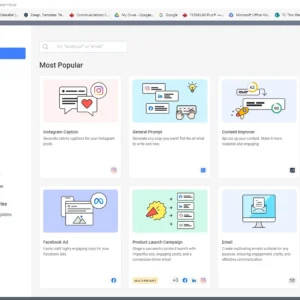
  • Pre-built templates for blogs, emails, outreach, and more.
  • One-click generation to start drafts quickly.

4. AI Research & Citations

  • Real-time or sourced information with citations for accuracy.
  • Summarize long sources into key takeaways for easy reference.

5. Rewriting, Paraphrasing & Editing

  • Rewrite sentences for clarity or tone without changing meaning.
  • Polish drafts with grammar and style improvements.

6. Collaboration & Team Features

  • Shared workspaces, comments, and role-based access for teams.
  • Audit trails to track edits and contributions.

Reviews

There are no reviews yet.

Be the first to review “HyperWrite AI – AI Writing Assistant for Faster Content”

Pricing & Plans Of HyperWrite

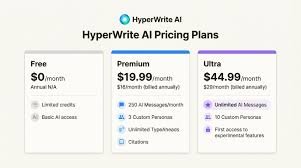
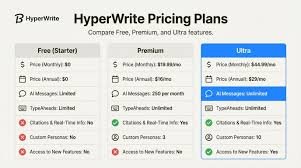
HyperWrite AI follows a freemium pricing model with a free Starter option and two paid tiers for power users.

  • Starter (Free): $0 per month – Limited credits and basic features to try HyperWrite AI.
  • Premium: $19.99/mo – Full access, 250 AI messages per month, citations + real-time info, 3 personas.
  • Ultra: $44.99/mo – Unlimited AI messages, 10 personas, early access to experimental features, unlimited TypeAheads.

Pro's

  • Fast drafting with real-time TypeAhead predictions that adapt to your voice.
  • Customizable tone and style for consistent branding across content.
  • Deep template library and citation-enabled content for credible outputs.

Con's

  • Lacks a built-in plagiarism checker in some plans. ([allaboutai.com](https://www.allaboutai.com/ai-reviews/hyperwrite-ai/?utm_source=openai))
  • Learning curve for teams to fully leverage advanced features. ([allaboutai.com](https://www.allaboutai.com/ai-reviews/hyperwrite-ai/?utm_source=openai))

Popular Use Cases of HyperWrite

  • Personal use
  • Business communications
  • Marketing content creation
  • Academic writing and research summaries

Alternatives of HyperWrite

Tool Best For How It Compares
KoalaWriter Budget-conscious content creators Lower price, fewer enterprise features
Frase SEO-focused content strategy Stronger SEO tooling, less emphasis on voice
Jasper Conversational marketing & long-form content Broader templates, differing pricing & usage caps

Feedback

From HyperWrite AI Chrome Extension:
“I quickly draft emails and posts with consistent voice.”

From Chrome Web Store listing:
“TypeAhead speeds drafting across sites and keeps context.”

FAQs related to HyperWrite

  1. Is HyperWrite AI free?
    Yes, there is a Starter/Free plan with limited credits and features.
  2. Can I use HyperWrite AI with Google Docs?
    Yes, via the Chrome extension that brings the AI into your browser.
  3. Does HyperWrite AI provide citations?
    Premium includes Citations + Real-Time Info for sourced content.

Start writing faster with HyperWrite AI

Try HyperWrite AI today and experience a writing partner that adapts to your voice, scales with your needs, and helps you publish with confidence. Get started with the free Starter plan or upgrade to unlock advanced features and real-time research capabilities.

Related Tools