
Kapwing – AI Video Editor for Quick, Creative Edits

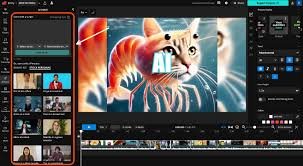
Kapwing is an AI powered online video editor designed for content creators, educators, and marketing teams who want fast, polished results. It blends templates, AI features, and collaborative editing to streamline social video workflows from anywhere.

Quick Facts - About Kapwing

Category Video Editing
Pricing Freemium
Platform Web, iOS, Android
Main Features Auto subtitling, templates, AI editing, stock assets
Best For Social creators, educators, marketers
Language Support UI in 25+ languages; captions in 76 languages
Integrations Cloud storage and team workspaces, URL imports
Deployment Web based with mobile apps

What is Kapwing ?

Kapwing is an AI-powered video editing platform that helps creators quickly produce polished videos from anywhere. It combines smart editing tools, captions, templates, and a browser based editor to speed up production.

Designed for individuals and teams, Kapwing enables fast collaboration, reusable components, and scalable workflows for social, education, and marketing content.

Description

1. Auto Subtitling and Translation

  • Automatically generate captions in multiple languages for videos.
  • Option to export SRT/VTT files or burn captions into the video.

2. Templates and Smart Resize

  • Access presets for social formats and automatic canvas resizing.
  • Save time by starting from branded templates and reusing assets.

3. AI Assisted Editing and Dubbing

  • AI driven edits, speech to text, and dubbing options to speed localization.
  • Cloud based AI tools that help you polish videos quickly.

4. Collaboration and Shared Workspaces

  • Team workspaces with roles, permissions, and project sharing.
  • Real time collaboration and version history to track edits.

5. Stock Library and Assets

  • Access to stock videos, photos, and audio to enrich projects.
  • Integrated asset search to accelerate production.

6. Export and Distribution Options

  • Export in multiple formats including MP4 and GIF with optional watermark removal.
  • Direct publishing readiness for social platforms and LMS exports.
Reviews

There are no reviews yet.

Be the first to review “Kapwing – AI Video Editor for Quick, Creative Edits”

Pricing & Plans Of Kapwing

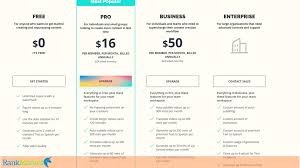
Kapwing uses a Freemium pricing model with a free tier and paid plans designed for individuals and teams. The main plans are Pro, Business and Enterprise, with features rising with each tier.

  • Free: $0 – Basic editing with watermark on exports.
  • Pro: $16 per user per month billed annually – watermark-free exports, 4K exports, larger uploads, unlimited projects, Brand Kit, collaboration.
  • Business: $50 per user per month billed annually – enhanced collaboration, custom fonts, team workspaces and SSO.
  • Enterprise: Contact Sales – custom pricing and dedicated support for large teams.

Source: Pricing page for Kapwing details on plans and limits. ([kapwing.com](https://www.kapwing.com/pricing/?utm_source=openai))

Pro's

  • Fast, AI assisted editing saves time for social content.
  • Collaborative workspaces support team workflows.
  • Flexible templates and auto subtitling improve accessibility.

Con's

  • Some features are restricted on the free tier with watermarks.
  • Export limits can be a constraint for long form edits on lower plans.

Popular Use Cases of Kapwing

  • Personal and creator projects for social media
  • Marketing campaign videos and ads
  • Educational tutorials and course content
  • Team collaboration for brand consistent videos

Alternatives of Kapwing

Tool Best For How It Compares
Canva Branding and quick social videos Strong templates, but edits are less advanced for heavy AI features
VEED.io Simple editing with captions Good for fast edits; AI features are growing but Kapwing offers deeper translation/dubbing options
WeVideo Education and team projects Robust collaboration; may be pricier and heavier for small teams

Feedback

From G2: “Kapwing is undeniably clever at drawing users in with their appealing branding, and promises of powerful editing tools.” ([g2.com](https://www.g2.com/products/kapwing/reviews?utm_source=openai))

From Trustpilot: “Tries so hard to be a legitimate video editor, but it is very basic.” ([trustpilot.com](https://www.trustpilot.com/review/www.kapwing.com?utm_source=openai))

FAQs related to Kapwing

  1. What is Kapwing?
    Kapwing is an online video editor with AI tools for fast editing, subtitling, and exporting.
  2. Is Kapwing free to use?
    Yes, there is a free tier with limitations; paid plans unlock more features and exports.
  3. Can I export 4K video?
    Export quality is available on Pro and above plans depending on the tier.

Start creating with Kapwing today

Join millions of creators who speed up video production with Kapwing. Try the free tier to explore AI editing, captions, and templates, then upgrade to unlock premium features for teams.

Related Tools