


Pictory – AI Video Editor for Quick, Engaging Video Content Now

Pictory helps content creators and marketers transform blogs, scripts, and long-form content into polished, shareable videos with automated captions, voiceovers, and stock media.

Quick Facts - About Pictory

Category Video Editing
Pricing Freemium
Platform Web-based
Main Features Auto-captioning, text-to-video, AI voiceovers, templates
Best For Content creators, marketers, SMBs
Language Support UI in English; subtitles in multiple languages
Integrations Export formats; direct publish to social platforms
Deployment Web-based

What is Pictory ?

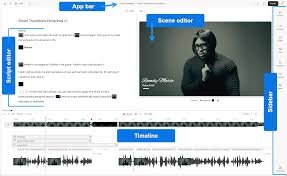
Pictory is an AI-powered video editing platform that turns scripts, blog posts, and long-form content into polished videos in minutes.

With AI-driven features like auto-captioning, voiceovers, and smart scene selection, Pictory eliminates heavy editing while keeping your brand and message on point.

Description

  1. Text-to-Video

    • Turn scripts, blogs, and social captions into ready-to-share videos.
    • AI-curated visuals and pacing align with your narrative.
  2. Auto Captioning

    • Accurate subtitles with multi-language support.
    • Subtitles can be styled to match branding.
  3. AI Voiceovers

    • Natural-sounding AI voices to narrate videos.
    • Adjust voice, speed, tone, and emphasis easily.
  4. Brand Kit & Templates

    • Save logos, palettes, and fonts for consistent branding.
    • Access a library of editable templates tailored for social formats.
  5. Media Library & Stock Footage

    • Extensive stock library for quick visuals.
    • Smart search and relevance tagging to speed up editing.
  6. Export & Publish

    • Export in MP4 with up to 4K resolution; direct publish to social platforms.
    • Subtitle export and compatibility with video players.
  7. Collaboration & Workflows

    • Invite teammates, assign roles, and track changes.
    • Commenting and version history to streamline review.
Reviews

There are no reviews yet.

Be the first to review “Pictory – AI Video Editor for Quick, Engaging Video Content Now”

Pricing & Plans Of Pictory

Pictory offers a scalable pricing model with a free entry tier and paid upgrades for more advanced features and higher usage limits.

  • Starter: $15–$25/mo – essential tools for individuals getting started.
  • Pro: $39–$59/mo – advanced features and higher export limits.
  • Business: $79–$99/mo – team collaboration and priority support.

Pro's

  • Fast turnaround for turning text into video content.
  • Automatic captions save time and improve accessibility.
  • Brand-safe templates and easy collaboration for teams.

Con's

  • Advanced video editing capabilities may be lighter than traditional desktop editors.
  • Reliance on internet connectivity for cloud-based processing.

Popular Use Cases of Pictory

  • Personal use
  • Business
  • Marketing
  • Education

Alternatives of Pictory

Tool Best For How It Compares
InVideo Marketing videos Greater template variety, may be more manual editing than AI
Descript Editing and transcription Strong audio editing, but not primarily video generation
Lumen5 Social video creation Similar AI-driven workflows, different stock library

Feedback

From G2: ‘Pictory makes video creation fast, affordable, and incredibly easy for our marketing team.’

From Capterra: ‘Intuitive AI editing and auto captions saved us hours on video production.’

FAQs related to Pictory

  1. What is Pictory best used for?
    Quick turning of text and long-form content into engaging videos for social and marketing.
  2. Does Pictory support captions and voiceovers?
    Yes, it offers auto-captioning and AI voiceover options to enrich videos.
  3. Can Pictory export 4K videos?
    It supports high-quality exports (up to 4K) and easy publishing to platforms.

Create stunning videos in minutes

Experience how AI-powered editing can accelerate your video production. Start your Pictory trial today and publish engaging content faster than ever.

Related Tools