Toonly – Animation Video Maker for Engaging Explainer Videos

Toonly is a user-friendly animation tool designed for marketers, educators, and creators who want vibrant explainer videos without needing design or coding skills.

Quick Facts - About Toonly

Category Animation
Pricing Premium
Platform Windows, macOS
Main Features Drag-and-drop editor, character library, templates
Best For Explainer videos, marketing, training
Language Support English UI; multi-language support varies
Integrations Standalone app; exports to MP4
Deployment Desktop application

What is Toonly ?

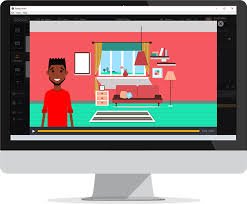
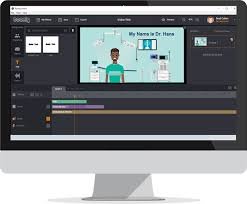
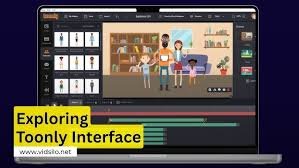
Toonly is an AI-powered animation studio that lets you design and animate scenes with a drag-and-drop interface, building professional videos without prior design experience. With a library of characters, props, and backgrounds, you can create training, marketing, or social media videos quickly, then export in standard formats.

Description

1. Drag-and-Drop Scene Builder

  • Intuitive interface to place characters, props, and backgrounds with ease.
  • Prebuilt templates to speed up video creation and maintain consistency.

2. Rich Character Library and Customization

  • Extensive roster of characters plus customization options for outfits, colors, and actions.
  • Animate expressions and gestures to match your script without animation skills.

3. Voiceover and Music Integration

  • Add voiceovers and royalty-free music directly within the project.
  • Sync audio to scenes for polished, professional results.

4. High-Quality Exports and Formats

  • Export videos in common formats (MP4) suitable for websites, social media, and presentations.
  • Optimized resolutions for web use and local playback.

5. Brand Customization and Templates

  • Save brand colors, logos, and fonts as templates for quick consistency.
  • Access recurring project templates to speed up repetitive workflows.

6. Collaboration and Sharing

  • Share projects with teammates for review and feedback.
  • Centralized project management to streamline approvals and updates.
Reviews

There are no reviews yet.

Be the first to review “Toonly – Animation Video Maker for Engaging Explainer Videos”

Pricing & Plans Of Toonly

Toonly offers a straightforward one-time license model with optional updates and support. This structure works well for individuals and teams who want long-term access without ongoing subscription fees.

Pro's

  • Fast creation of professional explainer videos with no design skills required.
  • Large library of characters and scenes that cover common business scenarios.
  • One-time purchase with lifetime access and updates for a period of time.

Con's

  • Desktop-only workflow may limit remote collaboration in real-time.
  • Advanced animation capabilities may be lighter than full 3D animation tools.

Popular Use Cases of Toonly

  • Marketing videos and product demos
  • Educational tutorials and training modules
  • Social media teasers and audience engagement
  • Internal communications and onboarding

Alternatives of Toonly

Tool Best For How It Compares
Vyond Business-focused explainer videos More business templates and team collaboration
Powtoon Educational and marketing videos Clear, story-driven templates with simpler editing
Animaker DIY animation with extensive assets Broader asset library and multi-style outputs

Feedback

From PlatformName:
“Toonly makes animated videos fast and easy for non-designers.”

From PlatformName:
“Great library of scenes and characters, good value for marketers.”

FAQs related to Toonly

  1. What can I create with Toonly?
    You can create explainer videos, product demos, tutorials, and marketing shorts without design skills.
  2. What formats can I export?
    Exports are available in common video formats suitable for web and presentations.
  3. Is Toonly suitable for teams?
    Yes, it supports multi-user workflows and project sharing for collaborative content creation.

Start Creating Engaging Animations Today

Unlock fast, professional storytelling with Toonly. No design skills required—just drag, drop, and publish. Try it now and elevate your video content.

Related Tools