
Wisecut – AI Video Editor for Faster, Engaging Content

Wisecut helps creators, educators, and brands quickly convert long footage into polished, social-ready clips by automating silences removal, captions, and audio balance.

Quick Facts - About Wisecut

Category Video Editing
Pricing Freemium
Platform Web browser
Main Features Auto cuts, captions, storyboard, smart music, punch-ins, auto reformat
Best For Content creators, marketers, educators
Language Support Captions + translations in multiple languages
Integrations Social scheduling & sharing
Deployment Web-based, cloud-assisted editing

What is Wisecut ?

Wisecut is an AI-powered automatic video editor that transforms long videos into short, shareable clips.

Its AI storyboard, auto captions, and silence removal streamline editing without requiring advanced video skills.

Description

1. Auto cut silences

  • Automatically detects and removes long pauses for snappier pacing.
  • Keeps essential dialogue with adjustable padding to avoid abrupt cuts.

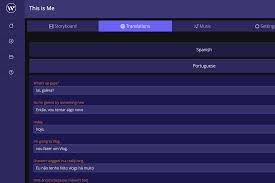
2. Auto subtitles and translations

  • Generates accurate captions from speech for accessibility.
  • Offers multilingual translations to reach global audiences.

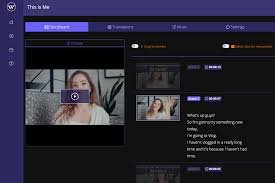
3. Storyboard-based editing

  • Transcripts become editable scenes, making reordering simple.
  • No complex keyframes required for basic tweaks.

4. Smart background music & audio ducking

  • Auto selects music that fits the mood.
  • Automatically lowers music volume when speaking to keep narration clear.

5. Auto zoom, punch-in/out and framing

  • Applies AI-driven zoom on speakers or actions.
  • Adapts to vertical, square, or horizontal formats for social platforms.

6. Auto reformat for social platforms

  • One-click resizing for YouTube Shorts, Reels, TikTok, and more.
  • Preserves key content across formats.

7. AI highlight detection

  • Identifies compelling moments to craft highlight clips.
  • Assists storyboard suggestions for faster edits.
Reviews

There are no reviews yet.

Be the first to review “Wisecut – AI Video Editor for Faster, Engaging Content”

Pricing & Plans Of Wisecut

Wisecut offers Free and paid tiers designed for creators of all levels. Free gives a limited monthly budget, while Starter and Professional unlock more minutes, higher resolutions, and additional features. Enterprise pricing is custom for teams.

  • Free: US$0 / month – 30 min/month, 720p preview, watermarked exports. Project expires after 7 days.
  • Starter: US$15 / month – 480 min/month, 1080p, up to 60 min per export, 4 GB/file, unlimited downloads. Projects expire after 30 days.
  • Professional: US$57 / month – 1800 min/month, 4K, up to 90 min per export, 5 GB/file, unlimited downloads. Projects expire after 30 days.
  • Enterprise: Custom pricing – API access and high-volume processing for teams.

Pro's

  • Speeds up editing with automated silences and storyboard-based control.
  • Captions and translations improve accessibility and reach.
  • Smart background music with audio ducking keeps narration clear.

Con's

  • Free plan uses watermarked exports and moderate resolution limits.
  • Some advanced edits may require manual tweaks for perfect captions.

Popular Use Cases of Wisecut

  • Personal use: Create short clips from long videos
  • Marketing: Produce promo reels with captions
  • Education: Convert lectures into bite-sized lessons
  • Social media: Resize for YouTube Shorts, TikTok, and Instagram

Alternatives of Wisecut

Tool Best For How It Compares
CapCut Mobile video editing Strong for quick edits, but Wisecut excels in auto captions and silences
Descript Collaborative editing and transcripts Descript offers heavier text-based editing beyond Wisecut’s auto features
Kapwing All-in-one online editor Kapwing covers more formats, Wisecut specializes in auto-cut and subtitles

Feedback

From PlatformName: “FitGap”

“Wisecut’s automated editing workflow saves me hours and produces consistent clips.”

([us.fitgap.com](https://us.fitgap.com/products/009253/wisecut-video?utm_source=openai))

From PlatformName: “ReviewHouse”

“The free plan lets you test core editing features with watermarked exports.”

([reviewhouse.com](https://www.reviewhouse.com/review/wisecut-video-review/?utm_source=openai))

FAQs related to Wisecut

  1. What is Wisecut?
    Wisecut is a browser-based AI video editor that trims silences, adds captions, and formats for social.
  2. Does Wisecut support translations?
    Yes, auto subtitles and translations are available on select plans.
  3. Is there a free plan?
    Yes, Wisecut offers a Free tier with limited minutes and watermarked exports.

Start editing faster with Wisecut today

Try Wisecut to automatically cut silences, add captions, and resize videos for social channels—saving hours and boosting engagement with every publish.

Related Tools