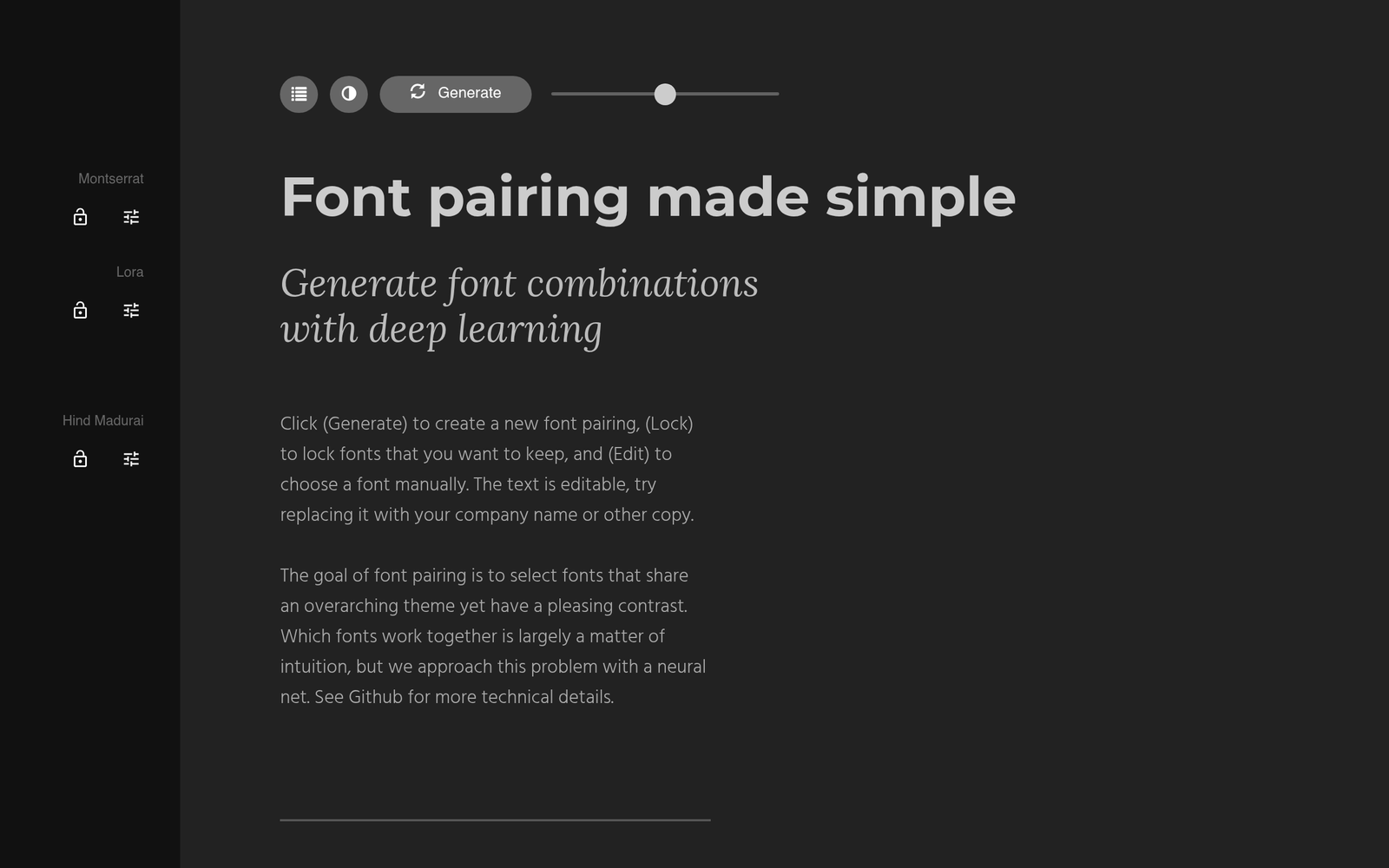
Fontjoy – AI font pairing generator for designers

ai font pairing helps designers quickly craft harmonious typography. Fontjoy analyzes thousands of font pairs using a neural network to suggest compatible options.

Category
For AI font pairing generator

Quick Facts - About Fontjoy

Category Design Systems & Foundations
Pricing Freemium
Platform Web browser
Main Features Neural network-based font pairings; Lock font to refine results; Google Fonts-based library; Three font roles (heading, subheading, body); Instant results
Best For Designers and developers creating typography systems
Language Support English UI
Integrations Google Fonts; Web/CSS usage
Deployment Browser-based; no installation

What is Fontjoy ?

Fontjoy is an AI-powered font pairing tool that uses a neural network to generate compatible font combinations instantly. It focuses on creating harmonious pairings for headings, subheadings, and body text to speed up typography decisions. The second paragraph explains the main problem it solves and who benefits most.

Description

1. Neural network-based font pairing

  • Generates font combinations in seconds by analyzing visual features.
  • Uses a small neural model trained on typography principles.

2. Instant pairing results

  • Refresh results with a single click for quick exploration.
  • Provides multiple viable options to compare quickly.

3. Lock and tweak fonts

  • Lock one font as you swap the other to refine matchups.
  • Preserves your preferred font choices while exploring alternatives.

4. Google Fonts integration

  • All pairings rely on Google Fonts for easy web deployment.
  • Drop-in font families that work in CSS and code projects.

5. Roles for heading, subheading, body

  • Preview font pairings in three roles to simulate real-page typography.
  • Helps you see how headlines, subheads, and body copy look together.

6. Lightweight and browser-based

  • No installation required; runs directly in your browser.
  • Accessible on desktop and mobile with a responsive layout.
Reviews

There are no reviews yet.

Be the first to review “Fontjoy – AI font pairing generator for designers”

Pricing & Plans Of Fontjoy

Free: Free – Access core font pairing generator with unlimited use. Starter: Contact for pricing – Expanded utilities for teams. Pro: Contact for pricing – Advanced controls and export options. Business: Contact for pricing – Team collaboration and admin features. Enterprise: Contact for pricing – SLA and dedicated support. Team: Contact for pricing – Shared workspace for multiple designers.

Pro's

  • Fast neural-network-based pairings that adapt to your input
  • Lock feature lets you preserve a font while exploring alternatives
  • Three font roles (heading, subheading, body) preview for realistic testing
  • Google Fonts integration ensures easy web deployment

Con's

  • Limited to fonts available via Google Fonts
  • Export options are basic and may require manual integration into projects
  • No built-in project management or versioning features

Popular Use Cases of Fontjoy

  • A designer testing two fonts for a website header to see contrast
  • A brand designer selecting a primary and secondary typeface for a campaign
  • A frontend developer generating type scales and CSS names for tokens
  • A student learning typography by comparing heading, subheading, and body pairings

Alternatives of Fontjoy

Tool Best For How It Compares
Fontpair.co Quick curated Google Font pairings Fontjoy uses AI to generate pairings on the fly, while Fontpair.co focuses on curated pairs.
Typewolf Real-world typography inspiration Typewolf shows usage patterns rather than generating pairings, so it complements Fontjoy.
Fonts In Use Brand-focused typography examples Fonts In Use provides examples, not a pairing engine, unlike Fontjoy.

Feedback

Representative user feedback:
“Quick, accurate font pairings save me hours in the design process.”

Representative user feedback:
“Locking fonts is a lifesaver for iterative client work.”

FAQs related to Fontjoy

  1. What fonts can Fontjoy pair?
    Fontjoy primarily pairs fonts from Google Fonts based on visual features.
  2. Can I export the pairing for use in my project?
    Fontjoy doesn’t export files, but you can load the chosen fonts via Google Fonts in your CSS and implement the pairing in your project.
  3. Does Fontjoy require an account?
    No account is required; you can use it directly in your browser.
  4. Is Fontjoy suitable for large teams?
    It’s great for quick ideation; for team workflows you can save or share pairings by screenshots or font-family names.

Start testing typography with Fontjoy today

Test new font pairings now and see how typography changes the feel of your designs. Try Fontjoy to quickly evaluate heading, subheading, and body options in your mockups.

Related Tools