


Void – Privacy-first open-source code editor for local development

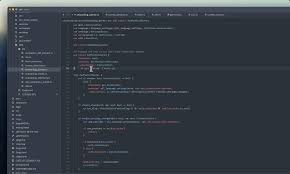
privacy-first open-source code editor designed for offline, local use. It keeps your code private by running entirely on your machine, without sending data to external servers. Ideal for developers who need control and privacy.

Category
For Privacy-first open-source code editor

Quick Facts - About Void

Category AI-Native IDE
Pricing Free (Free to use with paid plans)
Platform Desktop (Windows, macOS, Linux)
Main Features Zero data retention; BYOM; Local editing; Open-source; Extensible plugins
Best For Developers needing offline privacy and data sovereignty
Language Support English, community translations
Integrations Git, Terminal, Plugins
Deployment Local-only

What is Void ?

Void is an AI-powered privacy-first open-source code editor that runs locally on your machine to edit and manage code with privacy built in.

It solves the challenge of data leakage when using online editors by keeping all work on-device, benefiting security-conscious developers, teams in regulated industries, and anyone who prefers offline workflows.

Description

1. Local-first editing

  • All code edits occur on your device, not in the cloud.
  • Supports offline workflows and reduces data exposure.

2. Zero data retention

  • Does not store session data or code outside your machine.
  • Designed to meet GDPR and privacy-focused security standards.

3. GDPR-safe BYOM integration

  • Bring your own data and models securely within the editor.
  • Data never leaves your environment unless you choose to export.

4. Open-source architecture

  • Codebase is auditable and community-driven.
  • Transparent governance and contribution process.

5. Plugin-based extensibility

  • Extends with plugins built by the community.
  • Easy to customize workflows and tools inside the editor.

6. AI-assisted coding hints

  • Offers on-device AI suggestions for code and formatting.
  • Runs locally to avoid sending code to remote servers.
Reviews

There are no reviews yet.

Be the first to review “Void – Privacy-first open-source code editor for local development”

Pricing & Plans Of Void

Pricing is simple: Free tier with BYOM only, paid plans by request.

  • Free: Free – BYOM only, no in-app charges.
  • Starter: Contact for pricing – Intro plan for individual projects with limited extensions.
  • Pro: Contact for pricing – Advanced features and priority support.
  • Business: Contact for pricing – Team collaboration and governance tools.
  • Enterprise: Contact for pricing – Large-scale deployments and audit controls.
  • Team: Contact for pricing – Collaborative workflows for small teams.

Pro's

  • Zero data retention and on-device processing increase privacy by default.
  • Local-first design keeps all edits on your machine, reducing risk.
  • Open-source codebase allows auditing and community involvement.
  • BYOM support gives GDPR-safe data control without vendor lock-in.
  • Extensible via plugins and community extensions for customization.

Con's

  • Fewer built-in integrations than larger IDE ecosystems.
  • Smaller plugin marketplace may slow feature discovery.
  • Enterprise-ready features may lag behind heavier IDEs.

Popular Use Cases of Void

  • Editing confidential client projects offline without data leakage.
  • Setting up a secure development environment in regulated industries.
  • Working on air-gapped devices with private codebases.
  • Prototyping privacy-focused features with BYOM integration.

Alternatives of Void

Tool Best For How It Compares
Visual Studio Code General-purpose coding with extensions Widely adopted; may rely on extensions that touch data; Void focuses on offline BYOM.
Sublime Text Lightweight, fast editing Very fast and minimal; fewer built-in AI features; privacy-focused path with local editing.
JetBrains IntelliJ IDEA Java and multi-language projects Feature-rich but heavier; Void offers privacy and open-source transparency.

Feedback

Representative user feedback:
“Privacy matters and Local-first editors give real peace of mind.”

Representative user feedback:
“Open-source, offline editing and BYOM fit my security-first workflow perfectly.”

FAQs related to Void

  1. How does Void protect my data?
    On-device processing means no data leaves your machine unless you export.
  2. Can Void run offline?
    Yes, Void is designed to work entirely offline on supported desktop platforms.
  3. Is Void open-source?
    Yes, the codebase is open-source and auditable by the community.
  4. What platforms are supported?
    Void supports Windows, macOS, and Linux desktop environments.

Start Private Coding with Void Today

Try Void now to experience offline code editing with zero data retention and BYOM control. See how your work stays on your device with transparent, open-source tooling.

Related Tools