Hemingway Editor – Readability and Plain Language Editor

readability checker Hemingway Editor helps you simplify complex sentences and choose plain language. It highlights sentence length and passive voice, guiding edits for clear, concise writing.

For Readability checker + plain language editor

Quick Facts - About Hemingway Editor

Category AI Writing & Academic Integrity
Pricing Free (Free to use with paid plans)
Platform Web, Desktop
Main Features Readability scoring, Passive voice detection, Sentence length indicators, Plain language suggestions, Copy/export
Best For Students, writers, professionals seeking clear writing
Language Support English
Integrations Standalone app
Deployment Web and Desktop

What is Hemingway Editor ?

Hemingway Editor is an AI-powered writing assistant that analyzes text for readability, sentence length, and passive voice to guide edits.
It highlights longer sentences and difficult phrases so you can rewrite for clarity, helping students, professionals, and editors who want concise, accessible prose.

Description

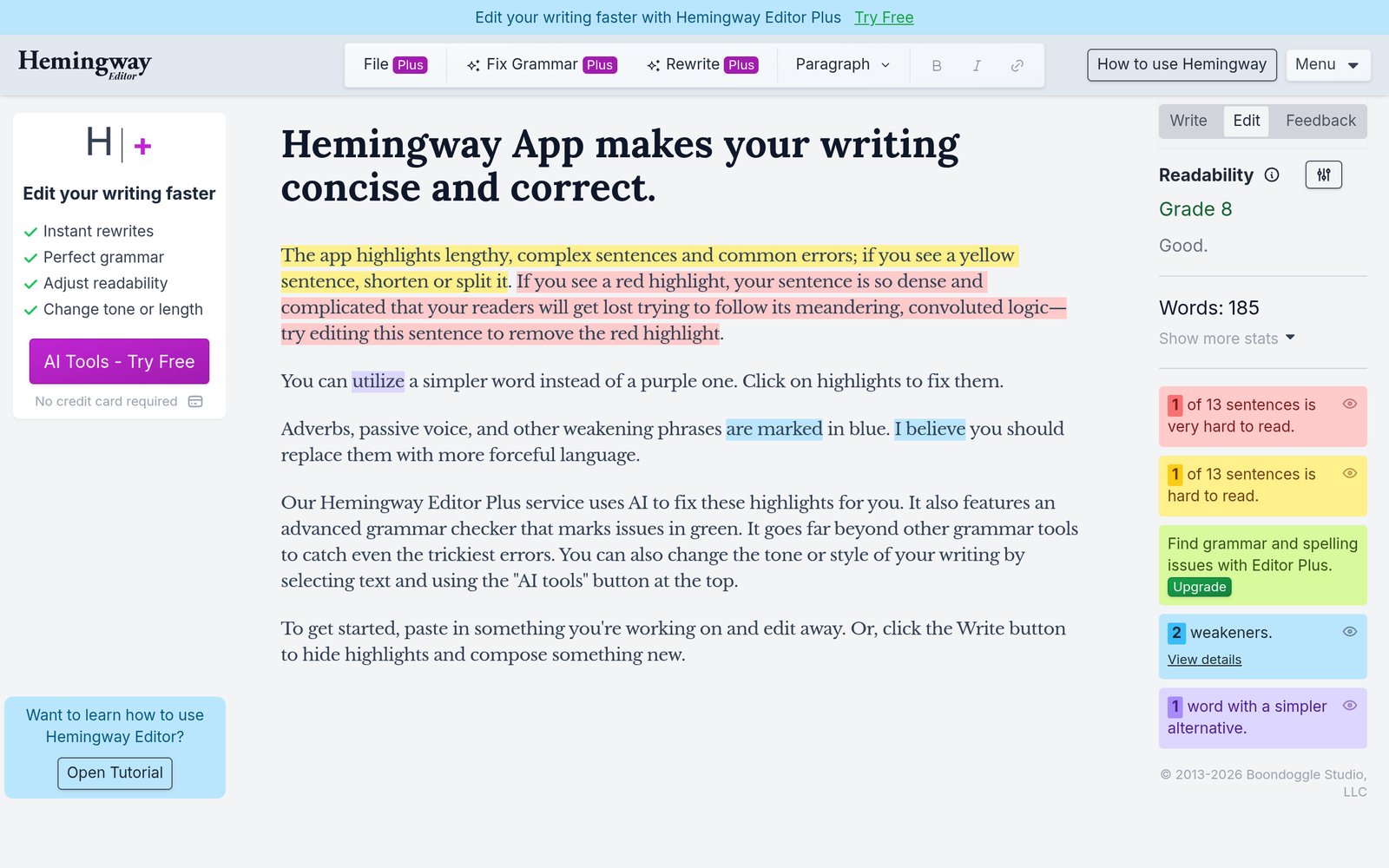
1. Readability scoring and color-coded highlighting

  • Shows reading ease and grade level to guide edits.
  • Color cues help you spot tough areas at a glance.

2. Passive voice detection

  • Marks passive constructions to encourage active writing.
  • Provides quick alternatives for stronger sentences.

3. Sentence length and complexity indicators

  • Flags long sentences and suggests breaks.
  • Helps you pace the text for readability.

4. Plain language suggestions

  • Suggests simpler synonyms to replace jargon.
  • Improves comprehension for a broad audience.

5. No AI-generated content

  • Does not write or rewrite content for you.
  • Computer-assisted guidance keeps your voice intact.

6. Copy and export options

  • Copy your edited text quickly to clipboard.
  • Desktop app supports offline editing and saving.
Reviews

There are no reviews yet.

Be the first to review “Hemingway Editor – Readability and Plain Language Editor”

Pricing & Plans Of Hemingway Editor

Pricing is Free to use with optional paid Desktop App.

  • Free: Free – Online editor with core readability features.
  • Starter: Contact for pricing – Desktop app license with offline editing.
  • Pro: Contact for pricing – Enhanced editing tools and priority support.
  • Business: Contact for pricing – Team licenses for multiple users.
  • Enterprise: Contact for pricing – Custom deployment and support.
  • Team: Contact for pricing – Small team licenses.

Pro's

  • Clear, at-a-glance readability feedback with color cues.
  • Encourages active voice and concise sentences for stronger writing.
  • Plain-language suggestions help reach broader audiences.
  • Desktop App option enables offline editing and saving.

Con's

  • Limited grammar and style suggestions beyond readability.
  • Best used for English text; non-English support is limited.
  • Not a full content generation tool; edits require manual changes.

Popular Use Cases of Hemingway Editor

  • Polish a college essay to meet readability standards before submission.
  • Refine a technical article so it is understandable to a general audience.
  • Rewrite a client proposal to remove jargon and increase clarity.
  • Review a blog post to improve flow and pacing.

Alternatives of Hemingway Editor

Tool Best For How It Compares
Grammarly Grammar and clarity for all writing Broad checks and style suggestions, but heavy on grammar guidance compared to Hemingway’s readability focus.
ProWritingAid In-depth writing analysis and style More features and reports, can be more complex to use than Hemingway’s focused readability cues.
WhiteSmoke All-around writing assistance Traditional checks with fewer readability-focused insights than Hemingway Editor.

Feedback

Representative user feedback:
“Users appreciate quick readability feedback but want more grammar guidance in one tool.”

Representative user feedback:
“Great for tightening prose, but not ideal for non-English writing tasks.”

FAQs related to Hemingway Editor

  1. What is Hemingway Editor best used for?
    It analyzes readability, sentence length, and voice to guide edits without generating new content.
  2. Is Hemingway Editor free to use?
    There is a free online option with a paid desktop app for offline use.
  3. Does it support non-English writing?
    The tool mainly targets English text and its features are strongest there.
  4. Can I export or copy my edited text?
    Yes, you can copy text to the clipboard and save from the desktop app where available.

Start Improving Your Writing Today

Try Hemingway Editor now to spot hard-to-read sentences and replace them with clear alternatives. You'll be able to copy your edited text quickly and, if you use the desktop app, save offline for later revisions.

Related Tools