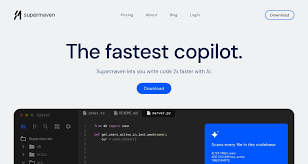
Supermaven – IDE extension for ultra-fast code completion

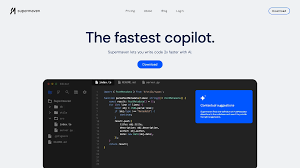
Ultra-fast code completion helps developers speed up coding in IDE extensions. It delivers low-latency, large-context suggestions to reduce context switching and keep you in flow.

Category
For Ultra-fast code completion

Quick Facts - About Supermaven

Category IDE Extension
Pricing Freemium
Platform Windows, macOS, Linux (IDE integrations)
Main Features Real-time AI code completion with large-context support
Best For Developers who need fast, contextual guidance in their editor
Language Support JavaScript, TypeScript, Python, Java, C++, and more
Integrations VS Code, JetBrains IDEs, Sublime Text, Neovim
Deployment Cloud-based or local IDE plugin

What is Supermaven ?

Supermaven is an AI-powered code completion assistant that delivers ultra-fast code completion inside your IDE as you type. It analyzes project context, language syntax, and recent edits to generate relevant completions. The main problem it solves is latency and context limits in traditional autocompletion, helping developers working on large codebases, teams, and fast-paced projects.

Description

1. Real-time Context-Aware Completions

  • Delivers relevant suggestions based on file context and project scope.
  • Reduces back-and-forth edits by predicting intent.

2. Low-Latency Inference

  • Sub-second response times even for large files.
  • Maintains context across edits to stay relevant.

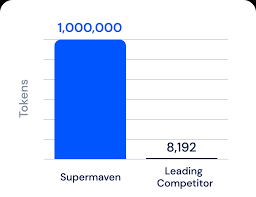
3. Large Context Window Support

  • Sees more of your codebase to inform suggestions.
  • Helps with long functions and multi-file workflows.

4. IDE Integration with Popular Editors

  • Works inside VS Code, JetBrains IDEs, Sublime, and Neovim.
  • Seamless setup with minimal configuration.

5. Smart Snippet Library

  • Offers reusable boilerplate and templates.
  • Allows custom snippets to align with your team’s conventions.

6. Safe Auto-Completion with Review Prompts

  • Flags risky completions for quick review.
  • Encourages best practices with prompts for refactoring.
Reviews

There are no reviews yet.

Be the first to review “Supermaven – IDE extension for ultra-fast code completion”

Pricing & Plans Of Supermaven

Pricing starts with a free tier and paid plans.

  • Free: Free – Core features with basic limits.
  • Starter: Contact for pricing – For individuals exploring more extended usage.
  • Pro: $10/mo – Best for small teams needing priority support and larger context windows.
  • Business: Contact for pricing – Teams needing collaboration features.
  • Enterprise: Contact for pricing – Large-scale deployments.
  • Team: Contact for pricing – Cross-team coordination.

Pro's

  • Sub-second response times for fast coding sessions.
  • Context-aware suggestions reduce errors and rework.
  • Strong IDE integration keeps your workflow intact.
  • Free access lets you try before committing.

Con's

  • Limited language coverage may affect some stacks.
  • Quality depends on project context and language model.
  • Some features require paid plan for advanced usage.

Popular Use Cases of Supermaven

  • Frontend developer completing React components with props and hooks in a large repo.
  • Backend engineer drafting SQL queries with table context and schemas.
  • Team onboarding new codebases by auto-generating boilerplate snippets.
  • Migrating a monolith to microservices and needing scalable code completion across files.

Alternatives of Supermaven

Tool Best For How It Compares
GitHub Copilot General code completion and AI-assisted coding Broad language support, strong IDE integration, but different pricing and performance characteristics.
Tabnine Context-rich AI code completion Offers different models and privacy options; may be slower in some environments.
IntelliCode Microsoft-ecosystem users seeking integrated hints Strong in Microsoft stack but less flexible across editors.

Feedback

Representative user feedback:
“Fast, context-aware completions save time but accuracy varies by project.”

Representative user feedback:
“Great latency, but language support is not universal yet across all editors and languages.”

FAQs related to Supermaven

  1. What IDEs does Supermaven support?
    It works with popular IDEs and editors via extensions and plugins.
  2. Is there a free plan?
    Yes, there is a free tier with core features.
  3. Can I customize completions?
    Yes, you can add snippets and tailor the prompts for your project.
  4. Does data leave my device?
    Deployment options include local and cloud modes with adjustable privacy controls.

Start coding faster with Supermaven today

Try Supermaven now and see real-time, low-latency suggestions in your editor. You will ship features faster, with fewer keystrokes and less context switching.

Related Tools