AskCodi – plain-English code explanations and generation for beginners

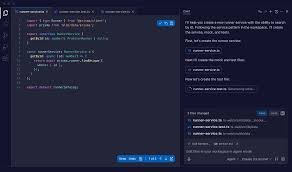
plain-English code explanations help beginners understand code faster. AskCodi explains and generates code directly in your IDE, making learning practical and hands-on.

Category
For Code explanation + generation for beginners

Quick Facts - About AskCodi

Category IDE Extension
Pricing Freemium
Platform VS Code, JetBrains IDEs, Sublime Text
Main Features Plain-English explanations, code generation, language support, inline guidance
Best For Beginners and students learning to code
Language Support Python, JavaScript, Java, C++, and more
Integrations Editor plugins and inline documentation
Deployment In-editor extension delivered via IDEs

What is AskCodi ?

AskCodi is an AI-powered code assistant that plugs into your IDE to explain and generate code in plain-English. It reads your code context and provides concise explanations and ready-to-run snippets to help you learn by doing.
It targets beginners and students who want clear reasoning and practical examples. The main problem it solves is the jump from syntax to understanding, making learning by example faster.

Description

1. Plain-English Explanations in Editor

  • Inline explanations describe what code does in plain language.
  • Shows why a snippet works and how to adapt it.

2. Beginner-Friendly Code Generation

  • Generates starter code tailored to your task.
  • Includes comments that explain each step.

3. Multi-Language Support

  • Supports Python, JavaScript, Java, C++, and more for common beginner tasks.
  • Helps learners practice across languages without leaving the editor.

4. In-Editor Learning Mode

  • Offers guided, step-by-step explanations while you type.
  • Lets you toggle explanations on or off as you code.

5. Real-Time Feedback and Suggestions

  • Alerts potential issues as you work and suggests improvements.
  • Provide inline tips to reinforce correct patterns.

6. Seamless IDE Integration

  • Works as a plugin inside popular editors.
  • Installs quickly and stays in sync with your editor updates.

Reviews

There are no reviews yet.

Be the first to review “AskCodi – plain-English code explanations and generation for beginners”

Pricing & Plans Of AskCodi

Pricing starts with Freemium access and paid tiers for individuals and teams.

  • Free: $0/mo – Basic features with limited usage.
  • Starter: $9.99/mo – Core features with standard support.
  • Pro: $19.99/mo – All features, priority support.
  • Team: Contact for pricing – Multi-user access for teams.

Pro's

  • Inline, plain-English explanations help you understand code faster.
  • In-editor code generation saves time when practicing new concepts.
  • Multi-language support covers beginner tasks across popular languages.
  • Real-time feedback helps you spot mistakes early.

Con's

  • May require time to adapt to in-editor explanations for advanced users.
  • Some advanced features are gated behind paid plans.

Popular Use Cases of AskCodi

  • Explain a Python loop to a beginner in the editor.
  • Generate a starter React component with inline explanations.
  • Convert a simple algorithm from pseudocode to Java with guidance.
  • Practice SQL queries with embedded explanations and comments.

Alternatives of AskCodi

Tool Best For How It Compares
GitHub Copilot Code suggestions inside IDE Great for autocompletion, but fewer explicit, beginner-focused explanations
Kite Python-focused code completion Strong completions with docs, but not focused on learning explanations
Tabnine Multi-language code completion Broad language support; limited in-editor learning guidance

Feedback

Representative user feedback:
“Clear, plain-English explanations help me understand code concepts step by step.”

Representative user feedback:
“The in-IDE explanations save me time and reduce frustration when learning new languages.”

FAQs related to AskCodi

  1. How does AskCodi help beginners?
    It explains code in plain language and generates starter snippets to practice.
  2. Which IDEs does it support?
    It works as an IDE extension for popular editors like VS Code and JetBrains products.
  3. Can I try it for free?
    Yes, there is a Freemium plan with a free trial period.
  4. What languages are supported?
    AskCodi supports multiple languages including Python, JavaScript, Java, and C++.

Start Learning to Code with AskCodi Today

Try AskCodi now and see how plain-English explanations turn coding into a step-by-step learning process. You will gain beginner-friendly guidance and practical examples you can apply immediately.

Related Tools