Gemini CLI – Terminal coding agent for developers

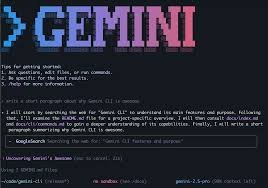
Terminal coding agent Gemini CLI helps developers write code and fix issues directly in the terminal. It delivers AI-assisted code suggestions and automated tasks to speed up development for solo developers and teams.

Category
For Google’s terminal coding agent

Quick Facts - About Gemini CLI

Category Terminal / CLI Agent
Pricing Free (Free to use with paid plans)
Platform Cross-platform (Windows, macOS, Linux)
Main Features AI-assisted terminal coding; 1,000 free requests/day; multi-language support; context-aware generation; CLI integrations
Best For Developers who rely on terminal workflows and Google Cloud tools
Language Support Multi-language prompts and code output
Integrations Google Cloud, Git, CI/CD pipelines
Deployment Local CLI or remote containers

What is Gemini CLI ?

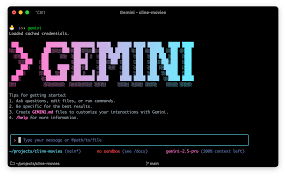
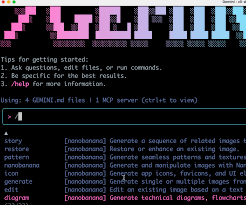
Gemini CLI is an AI-powered terminal coding assistant that sits in your command line session, offering real-time code suggestions and command automation. It analyzes prompts and context to generate code, run tasks, and streamline shell-based workflows. The second paragraph explains the main problem it solves and who benefits most: The main problem it solves is reducing context switching between editors and the shell, speeding up coding, testing, and deployment tasks for developers who work in terminals and cloud environments.

Description

1. AI-assisted terminal coding

  • Generates real-time code suggestions and boilerplate directly in your terminal.
  • Supports common languages and frameworks used in cloud and web projects.

2. Free daily quota

  • Offers 1,000 free requests per day on the free tier.
  • Quotas are adjustable with paid plans for higher usage.

3. Multi-language support

  • Prompts and outputs support multiple programming languages and shell syntax.
  • Helps bridge between languages in polyglot projects.

4. Context-aware code generation

  • Uses session context to tailor suggestions to your current project.
  • Reduces back-and-forth by remembering your recent commands and goals.

5. Integrations with Google Cloud and Git

  • Works alongside Google Cloud tools and Git workflows in the terminal.
  • Supports common CI/CD pipelines via CLI automation.

6. Lightweight, zero-config CLI

  • Runs in standard terminals with minimal setup.
  • Consumes modest system resources and starts quickly.
Reviews

There are no reviews yet.

Be the first to review “Gemini CLI – Terminal coding agent for developers”

Pricing & Plans Of Gemini CLI

Pricing is tiered with a free base and paid upgrades.

  • Free: Free – Basic access with 1,000 daily requests and core CLI features.
  • Starter: Contact for pricing – Ideal for individual developers needing more usage and faster responses.
  • Pro: $20/mo – Standard plan with higher quotas and priority support.
  • Business: Contact for pricing – Team-oriented features and larger collaboration limits.
  • Enterprise: $250/mo – Highest quotas, premium support, and advanced admin controls.
  • Team: Contact for pricing – Centralized management for teams with centralized billing.

Pro's

  • Generous 1,000 daily free requests that unlocks hands-on experimentation.
  • CLI-first experience keeps you in the terminal without context switching.
  • AI-generated code suggestions save time on boilerplate and debugging.
  • Multi-language support helps polyglot projects and diverse teams.
  • Lightweight and fast to start in any terminal.

Con's

  • CLI-focused experience may lack rich editor features compared to GUI IDEs.
  • Free quota may be insufficient for heavy or enterprise-grade projects.
  • Advanced features may require familiarity with CLI prompts and syntax.

Popular Use Cases of Gemini CLI

  • A backend engineer bootstraps a new microservice by generating scaffold code directly in the terminal.
  • A DevOps engineer automates routine tasks and deployments with CLI commands.
  • A data scientist writes Python data pipelines directly in terminal and tests them.
  • A freelance developer prototypes ideas quickly by generating code snippets and running in shell.

Alternatives of Gemini CLI

Tool Best For How It Compares
Tabnine Broad editor and language support CLI integration is limited; Gemini CLI is terminal-first with Google Cloud integration.
Codeium Open-source friendly teams Codeium is editor-focused; Gemini CLI targets terminal workflows with higher free quota.
Kite Python developers Gemini CLI emphasizes terminal usage and automation beyond in-editor suggestions.

Feedback

Representative user feedback:
“Saves time in the terminal, but quotas can slow heavy workflows.”

Representative user feedback:
“Great for solo projects, but teams may need easier collaboration features.”

FAQs related to Gemini CLI

  1. What is Gemini CLI?
    Gemini CLI is an AI-powered terminal coding assistant that runs in your shell to generate code and automate tasks.
  2. How many free requests do I get?
    There are 1,000 free requests per day on the free tier.
  3. What happens if I exceed the free quota?
    You can upgrade to paid plans to access higher quotas and additional features.
  4. Is it suitable for teams?
    Yes, there are team and enterprise options with centralized management and higher quotas.

Start coding smarter with Gemini CLI today

Try Gemini CLI now to accelerate your terminal workflows and reduce context switching. You’ll see AI-assisted code suggestions, quicker scaffolding, and the ability to run tasks without leaving the shell. Get started and scale your usage as your projects grow.

Related Tools