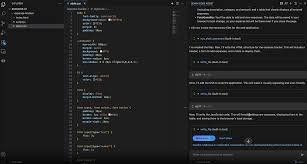
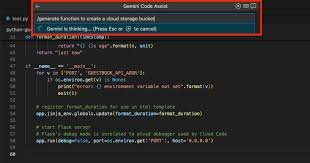
Gemini Code Assist – ai code assistant for VS Code and JetBrains

ai code assistant Gemini Code Assist speeds up coding by suggesting relevant snippets in real time. It works inside VS Code and JetBrains to boost productivity for developers who need quicker, cleaner code.

Category
For Gemini-powered coding in VS Code/JetBrains

Quick Facts - About Gemini Code Assist

Category IDE Extension
Pricing Free (Free to use with paid plans)
Platform VS Code, JetBrains IDEs, Android Studio native
Main Features Real-time AI code completion; Context-aware snippets; Inline explanations
Best For Developers who want Gemini-powered coding inside their IDEs
Language Support Multiple languages including Kotlin, Java, TypeScript, Python
Integrations Google Cloud, Firebase
Deployment Plugin/extension installed in IDE

What is Gemini Code Assist ?

Gemini Code Assist is an AI-powered code assistant plugin that brings Gemini-powered coding capabilities into popular IDEs like VS Code and JetBrains. It analyzes your code context and offers real-time completions, snippets, and refactors powered by the Gemini model.

Developers facing boilerplate tasks and slow iterations benefit most, including mobile and web engineers who rely on Kotlin, Java, TypeScript, and Python across Android Studio, VS Code, and JetBrains IDEs.

Description

1. Real-time AI code completion

  • Offers live, context-aware suggestions as you type in VS Code, JetBrains, and Android Studio.
  • Reduces syntax errors and speeds up initial scaffolding in new files.

2. Context-aware snippets and templates

  • Inserts relevant code blocks based on project type and framework.
  • Helps bootstrap features quickly with correct patterns.

3. Android Studio native integration

  • Delivers Gemini-powered features as a native plugin inside Android Studio.
  • Meshes mobile development workflows with AI-assisted coding.

4. Google Cloud + Firebase integration

  • Generates boilerplate for cloud functions, auth, and data models leveraging Google Cloud and Firebase.
  • Speeds backend wiring for apps that use Google services.

5. Multi-language support

  • Supports Kotlin, Java, TypeScript, Python, and more within the same IDE session.
  • Helps teams work across frontend, backend, and mobile codebases.

6. Inline explanations and docs

  • Shows in-editor explanations for suggestions and snippets.
  • Helps new team members understand why a snippet is recommended.
Reviews

There are no reviews yet.

Be the first to review “Gemini Code Assist – ai code assistant for VS Code and JetBrains”

Pricing & Plans Of Gemini Code Assist

Pricing starts with a Free tier and scalable plans for teams.

  • Free: Free – Basic features for individuals to try out.
  • Starter: Contact for pricing – For individuals exploring more features.
  • Pro: Contact for pricing – For small teams needing more power.
  • Business: $45/user/mo – Team-focused plan with priority support.
  • Enterprise: Contact for pricing – Large organizations with custom needs.
  • Team: Contact for pricing – Mid-size teams needing collaboration features.

Pro's

  • Context-aware suggestions cut keystrokes and improve coding speed.
  • Native Android Studio integration for mobile developers.
  • Google Cloud and Firebase integration speeds backend code generation.
  • Works across VS Code and JetBrains IDEs for a consistent workflow.
  • Inline explanations help new teammates learn patterns quickly.

Con's

  • Relies on network access for the Gemini model, which may affect offline work.
  • Pricing may rise with team size and cloud usage.
  • Generates suggestions that still require human review for critical code.

Popular Use Cases of Gemini Code Assist

  • A React developer in VS Code uses AI-generated component templates to speed UI work.
  • An Android Studio user gets Kotlin code scaffolds and API integrations with AI help.
  • A Firebase-backed project uses AI to scaffold Cloud Functions and security rules.
  • A multi-language project uses the same IDE to receive AI-guided refactors across languages.

Alternatives of Gemini Code Assist

Tool Best For How It Compares
GitHub Copilot Broad language support and deep IDE integration Trains on public code to suggest entire lines and blocks; strong in GitHub ecosystem
Kite Lightweight Python-focused coding assistant Offers Python-centric completions with offline options in some cases
Tabnine Multi-language completions with privacy options Uses AI models on-device or in the cloud for flexible privacy

Feedback

Representative user feedback:
\”Users want faster inline suggestions and smoother IDE integration for daily coding.\”

Representative user feedback:
\”Teams need reliable AI code reviews and multi-language support across projects.\”

FAQs related to Gemini Code Assist

  1. Which IDEs are supported?
    Gemini Code Assist works in VS Code and JetBrains IDEs, with Android Studio native integration where available.
  2. Is there a free plan?
    Yes, there is a Free tier; paid Business plans are available for teams.
  3. Does it work offline?
    Core features rely on cloud models; offline usage is limited depending on the IDE.
  4. Does it integrate with Google Cloud and Firebase?
    Yes, it can generate and scaffold backend code using Google Cloud and Firebase integrations.

Start coding smarter with Gemini AI

Get started with Gemini Code Assist today and see faster code suggestions in your IDE. Install the extension in VS Code or JetBrains and connect to Google Cloud for enhanced backend hints.

Related Tools