
JetBrains Junie – AI agent for JetBrains IDEs

ai agent for jetbrains brings an AI assistant inside your JetBrains IDEs to help code and navigate projects. It delivers contextual suggestions and automated actions right where you work.

Category
For AI agent inside JetBrains IDEs

Quick Facts - About JetBrains Junie

Category IDE Extension
Pricing Freemium
Platform JetBrains IDEs (IntelliJ IDEA, PyCharm, WebStorm, etc.)
Main Features AI-assisted coding, context-aware suggestions, in-editor actions
Best For Developers using JetBrains IDEs seeking in-editor AI help
Language Support Multi-language (depends on IDE)
Integrations JetBrains plugins, Git, issue trackers
Deployment Desktop IDE plugin

What is JetBrains Junie ?

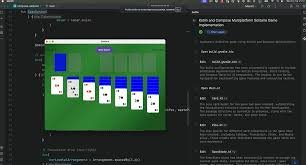
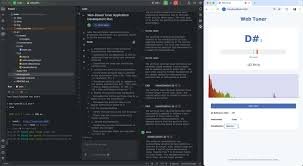
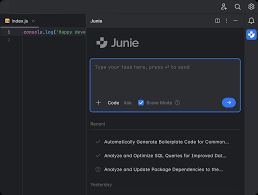
JetBrains Junie is an AI-powered assistant embedded inside JetBrains IDEs that understands your code, current file, and project context to offer proactive actions and smart suggestions. The tool runs as a plugin inside compatible JetBrains IDEs and uses your project context to tailor recommendations. The main problem it solves is reducing routine context switching and speeding up coding, code review, and exploration. It benefits developers who work across multiple JetBrains IDEs, teams that rely on consistent patterns, and anyone who wants faster, more accurate in-IDE guidance.

Description

1. Deep JetBrains integration

  • Seamless access to project context, settings, and plugins inside the IDE.
  • Leverages the JetBrains plugin API for a consistent UX.

2. Context-aware code completion and snippets

  • Provides AI-generated code completions based on current file and project conventions.
  • Offers ready-to-use snippets tailored to language and framework.

3. In-editor actions and workflows

  • Executes common tasks as commands or quick actions within the editor.
  • Automates routine edits, tests, and project scaffolding.

4. Code navigation and refactoring help

  • Suggests navigation shortcuts and safe refactors based on code graph.
  • Highlights potential improvements with concrete change recommendations.

5. Cross-IDE consistency

  • Maintains AI behavior across the JetBrains IDE family.
  • Syncs preferences and AI models within the ecosystem.

6. Privacy and security controls

  • Controls data used for AI features and telemetry.
  • Respects JetBrains security standards and user consent choices.

7. Freemium access with paid upgrade

  • Offers a free tier with core features and paid upgrades for more controls.
  • JetBrains All Products plan provides extended AI features across IDEs.

Reviews

There are no reviews yet.

Be the first to review “JetBrains Junie – AI agent for JetBrains IDEs”

Pricing & Plans Of JetBrains Junie

Pricing plans start with a freemium option and scale to All Products coverage.

  • Free: Free – Basic AI features within a single JetBrains IDE.
  • Starter: Contact for pricing – Core AI features across up to 2 IDEs.
  • Pro: Contact for pricing – Expanded AI features across multiple IDEs and teams.
  • Business: Contact for pricing – Collaboration features and admin controls.
  • Enterprise: Contact for pricing – Scaled deployment with security controls.
  • Team: Contact for pricing – Team-wide licenses and centralized management.

Pro's

  • Deep integration with JetBrains IDEs provides a familiar UX
  • Context-aware coding suggestions align with project style
  • Inline actions save time on repetitive tasks
  • Cross-IDE consistency within the JetBrains product family
  • Supports team workflows with shared AI patterns and templates

Con's

  • Requires a JetBrains IDE and internet connection for AI features
  • Performance may vary on very large projects or older hardware
  • Language support depends on the IDE and installed plugins

Popular Use Cases of JetBrains Junie

  • Automatically generate boilerplate code and templates in a PyCharm project
  • Offer real-time AI suggestions while coding in IntelliJ IDEA for Java apps
  • Generate test stubs and documentation comments in WebStorm projects
  • Suggest safe refactors and navigation paths during a large code walk

Alternatives of JetBrains Junie

Tool Best For How It Compares
GitHub Copilot Broad language support across IDEs Great code completion; relies on cloud model; JetBrains integration via plugin.
Kite Lightweight AI coding assistant with local model Local execution; fewer JetBrains-specific features but good for privacy.
Tabnine Cross-language AI completions Supports JetBrains via plugin; strong completion but generic guidance.

Feedback

Representative user feedback:
“Developers want fast, in-context help inside their IDE; Junie delivers that but needs tuning over time.”

Representative user feedback:
“AI suggestions are helpful but can miss project conventions; users want control over data sharing.”

FAQs related to JetBrains Junie

  1. Which IDEs support JetBrains Junie?
    JetBrains Junie works as a plugin inside supported JetBrains IDEs like IntelliJ IDEA, PyCharm, WebStorm, and others in the JetBrains family.
  2. Does Junie work offline?
    Some features require online access for model updates; offline capabilities are limited to cached guidance.
  3. How is pricing structured?
    The product uses a Freemium model with a paid All Products option; exact prices are available on request.
  4. Can Junie help with code reviews?
    Yes, it can suggest improvements, patterns, and maintain consistency during reviews.

Start coding faster with Junie today

Enable Junie in your JetBrains IDEs now to access in-editor AI guidance and automation. See how context-aware suggestions speed up common tasks and keep coding momentum.

Related Tools